Quick answer — which path fits my car?
You slide into the driver’s seat, plug in your phone, and get the same letdown: no CarPlay, no Android Auto, just the car’s old screen. The fix that worked for your neighbor’s car may do nothing in yours — a wireless adapter, for example, only works on cars that already have factory wired CarPlay, and it won’t add CarPlay to a car that never had it. Get this wrong and you’ve wasted money on a box that can’t do the job.
- If you already have wired CarPlay or Android Auto: You just need a wireless adapter or an AI box. These plug into your existing USB port to add wireless freedom or even full Android apps without changing your dashboard.
- If your car supports CarPlay but it’s “locked”: This is common in newer BMWs (2016+). You don’t need new hardware; you just need a software activation via a USB stick or remote coding to unlock the feature that is already hidden in your system.
- If your car has no CarPlay or Android Auto at all: You have two main choices. You can install a retrofit module that “injects” the interface into your original screen, or you can replace the entire head unit (the car’s radio) with a new aftermarket one.
Know before you buy — hard compatibility gates
Every upgrade path has a “dealbreaker” rule. If you ignore these, you will likely end up with a device that simply won’t work.
Wireless adapters and AI boxes These are not magic fixes for every car. They only work if your car already has factory-installed wired CarPlay or Android Auto on a data-capable USB port. If your car only has a USB port for charging, or if it only supports Bluetooth audio, these devices will not function.
Software activation This path is strictly for cars where the hardware is already present. It is essentially giving the car permission to use code that is already sitting in its memory. It cannot add hardware to a car that doesn’t have it.
Retrofit modules These are more complex installs. They require specific harness adapters to talk to your car’s proprietary language (like LVDS or CAN-bus signaling). If you try to skip the correct emulators or harnesses, you will likely end up with a blank screen or steering wheel buttons that do nothing.
Head unit replacement Replacing your radio is a physical job. To do it right, you need a vehicle-specific wiring harness so you don’t have to cut your factory wires. You also need a dash kit to make the new unit fit the hole in your dashboard and an interface module to keep things like your steering wheel controls and reverse camera working.
The six upgrade paths compared
Prices in this guide are vendor listings as of 2026-08-11 and can change, so confirm the current price on the seller page before you buy.
| Upgrade Path | Typical Cost | Install Difficulty | What You Gain |
|---|---|---|---|
| Wireless Adapter | $58–$169 | Very Low | No more cables |
| Software Activation | ~$300 (BMW) | Medium | Factory CarPlay with no new parts |
| Head Unit Swap | $450–$900+ | High | Best audio and full wireless features |
1. Wired baseline
This is your starting point. You use a Lightning or USB-C data cable to connect your phone to a data-capable port. It is the most reliable and keeps your phone charged, but it keeps you tethered to a cord.
2. Wireless adapters
These are small USB dongles. They plug into your wired CarPlay port and pretend to be your phone. They use Bluetooth to pair and then switch to a high-speed Wi-Fi link to send the data.
- Carlinkit 5.0 (2Air): A highly recommended, budget-friendly pick.
- Carlinkit Mini Ultra: A tiny form factor that is easy to hide.
3. AI boxes
An AI box is essentially a small Android computer that “masks” itself as an iPhone. When you plug it in, your car thinks it’s connected to a phone, but the screen actually shows a full Android interface. This lets you run apps like YouTube or Netflix directly on your car screen.
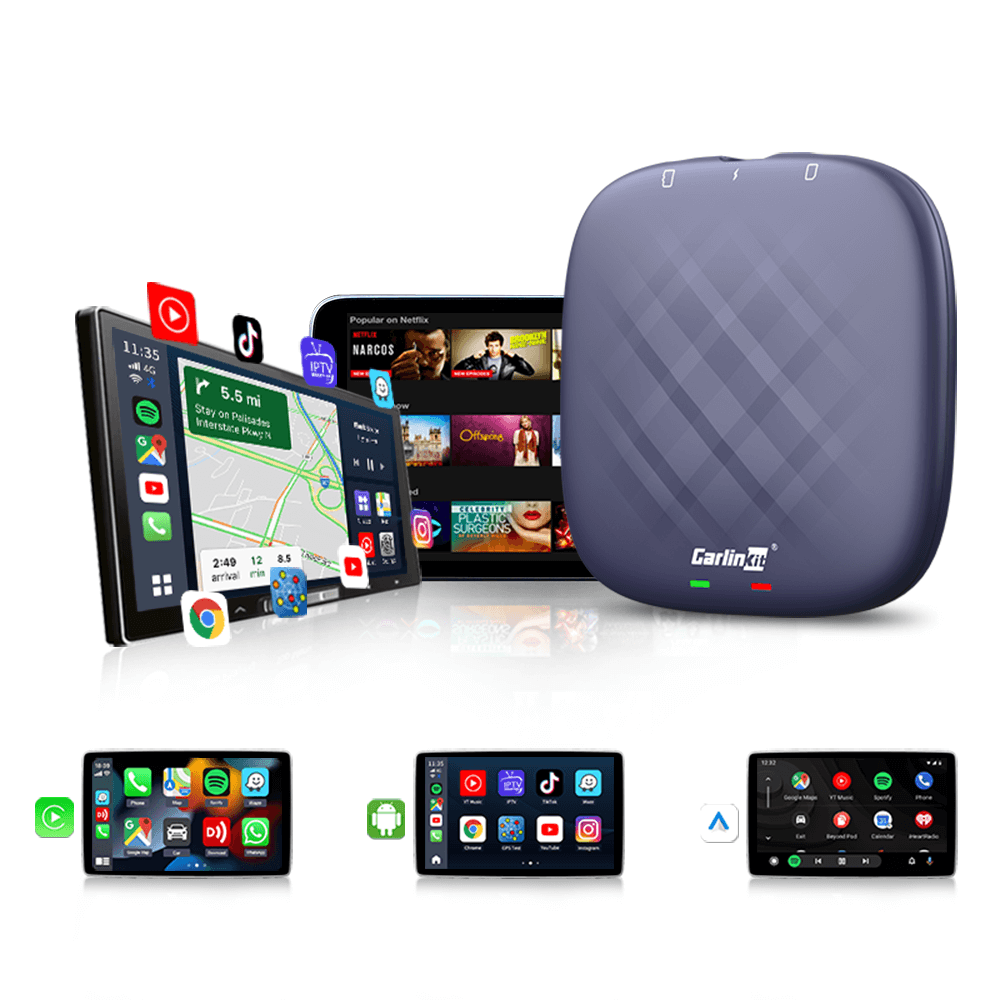
CarlinKit Ai Box Tbox Plus Multimedia Adapter with Wireless Carplay & Android Auto
gearnudge.com
- Best for
- A powerful Android 13 box for full app support
- Avoid if
- You need confirmed live price or guaranteed fit from this page.
- Evidence
- Listing and source evidence
- Carlinkit Tbox Plus: Uses a Qualcomm 8-core processor for smooth performance.
- CARPURIDE H01: A great mid-range option with Android 11.
4. Software activation (BMW)
If you own a 2016+ BMW with NBT Evo or iDrive 7, you might already have the ability to use CarPlay. You just need a 20-digit VIN-specific code (FSC code) or a signed activation file to turn it on.
5. Retrofit modules
These boxes sit between your original head unit and your screen. They allow you to keep your original knobs and display while injecting a new interface. This is a popular choice for BMW owners looking to keep their factory look.
6. Head unit replacement
This is the “big” upgrade. You remove your factory radio and install an aftermarket unit like a Sony or Pioneer. This is the best way to get high-quality audio and built-in wireless features if your car never had them.
[Note: Professional installation is highly recommended for head unit swaps to ensure your steering wheel controls, factory amplifier, and reverse camera all continue to work perfectly.]
Car-specific gotchas that derail installs
Upgrades aren’t always “plug and play.” Here are some real-world issues reported by owners:
- The BMW Exception: Most Carlinkit wireless adapters (3.0, 4.0, 5.0) are explicitly incompatible with BMW. If you drive a BMW, stick to MMI retrofit modules or software activation.
- Toyota Control Issues: Some owners of 2020+ Toyotas have reported that steering wheel controls stop working after iOS updates. A quick way to fix this is to power-cycle your phone.
- The “Next Track” Glitch: Some Carlinkit adapters cause the “Next Track” button on your steering wheel to skip songs indefinitely.
- Power Problems: Modern cars like the 2023/2024 Mazda, Hyundai Ioniq, or Toyota often have USB ports that don’t provide enough power for AI boxes. You might need an external power cable to keep the device stable.
- Charging Conflicts: If you plug your phone into a “charge-only” USB port while using a wireless adapter, it can actually drop your connection and crash the session.
Setup, placement, and day-zero checks
For wireless adapters: Update the firmware through the companion app or web interface before your first drive. Usually, you pair the phone via Bluetooth, and the adapter handles the Wi-Fi handoff automatically.
For AI boxes: Once plugged in, you can tuck the box away in your glove box or a console cubby. If your car’s USB ports stay powered even when the engine is off, you might need a “deep-sleep” kit or a Y-cable to prevent the box from draining your battery while the car is parked.
For head unit swaps: Always “bench-test” the new unit. Plug everything in and test the volume, camera, and CarPlay while the radio is still loose on your desk. This prevents you from having to take the whole dashboard apart again if something doesn’t work.
Avoid if…
Do not buy if:
- Your car has no factory wired CarPlay/Android Auto: A wireless adapter or AI box will not work. They only convert an existing system; they don’t add one.
- You drive a BMW and want a Carlinkit adapter: These are not compatible.
- You have a lease: Head unit replacements and retrofit modules require taking the dash apart and running new wires, which you likely cannot do with a leased vehicle.
- You are buying from a questionable source: Avoid cheap retrofit boxes from sellers that offer no verifiable warranty. They often arrive dead or fail within months with no way to get your money back.
FAQ
Will wireless CarPlay drain my phone battery faster?
Yes. Wireless projection uses both Bluetooth and a high-speed 5 GHz Wi-Fi link. This makes the phone work harder, which generates more heat and uses more battery than using a cable.
Can I move an AI box to another car?
Only if the second car also has factory wired CarPlay or Android Auto. The box "tricks" the car into thinking it is an iPhone, so it needs that specific connection to function.
Is professional install worth it for a head unit swap?
Usually, yes. Professionals know how to use interface modules to keep your factory chimes, warning lights, and steering wheel controls active. This is where most DIY installs fail.
Do I lose factory features with a retrofit?
Not if you do it right. As long as you use a module that includes a steering-wheel control emulator and a CAN-bus interface, your original buttons and knobs will work just like they used to.