Quick answer: What a clean daily driver setup includes
You hit the button to raise your standing desk and the cables go tight; lower it and they fall into a tangle. That’s the frustration clips alone can’t solve — every height change messes the desk up again. The real fix is a system that moves with you: power strip mounted underneath, cables routed through a monitor arm’s hollow channel, and the screen set to the right height.
- Under-desk power: Mount your power strip to the underside of your desk using double-sided tape. This prevents cables from getting pulled or tangled every time you raise the desk.
- Invisible routing: Use a monitor arm with hollow channels. This allows you to tuck power and video cables inside the arm itself.
- Ergonomic height: Set your monitor so the center sits about 15 to 20 degrees below your horizontal eye level. This prevents neck strain during long sessions.
Who this is for
This guide is for people who want to turn a cluttered workspace into a functional one. It is specifically helpful if:
- You own a standing desk: Adjustable desks create “cable tension.” This happens when the movement of the desk pulls on your cords, making everything a mess again as soon as you change heights.
- You charge many devices: If your desk is covered in power bricks for phones, tablets, and headphones, you need a way to consolidate them into one path.
- You hate screen wiggle: If your monitor shakes when you type or move your mouse, you need a more stable mounting solution.
If your desk is very thin or your monitor arm is flimsy, skip this. A cheap arm will only make the wobble worse, which can actually make you feel nauseous while working.
How to choose: mount, cable, charger, screen
Before you buy anything, check these four compatibility gates to ensure you don’t end up with a pile of gear that doesn’t fit.
The Mount Don’t just look for the VESA pattern (the hole pattern on the back of your monitor). You must also check the weight rating of the arm. A heavy monitor on a light-duty arm will sag. Also, if you have a thin desk, look for a reinforcement support board to prevent the clamp from crushing the wood.
The Cables Check the “hollow-channel capacity.” Most monitor arms have built-in channels to hide wires, but they are often quite small. Count your cables first. If you have thick, heavy power bricks and several video cords, a standard arm might be too tight.
The Charger Match the charger to your “total device load.” This means looking at the total wattage. If you want to charge a laptop and a phone at the same time, a single-port charger won’t cut it. Look for multi-port GaN (Gallium Nitride) chargers, which are more efficient and compact.
The Screen Placement depends on size. For screens 32 inches or larger, don’t focus on the top edge. Instead, make sure the center of the screen is in that 15–20 degree downward zone. If you force the top edge to eye level on a massive screen, you will end up looking too far up.
Product options: mounts and screens
If you are looking for a way to lift your screen and hide the clutter, these are the two paths to take.
The Ergotron LX is the standard recommendation. It is well-built, moves smoothly, and can handle monitors up to 34 inches and 25 lbs.
The Herman Miller Jarvis Single Monitor Arm is a great “do-it-all” choice. It features cable management tools that are very easy to use because they can be detached and re-attached easily. It works for 13 to 32-inch displays and comes with a 5-year warranty.
Product options: cable kits, chargers, and car cables
To finish the job, you need the actual tools to tie everything together.
Desk Management For an all-in-one solution, the N NOROCME Cord Management Kit is a top pick. It comes with split sleeves, adhesive clips, Velcro, and zip ties to handle an entire desk in one box.
For power, the Anker Prime 67W GaN is the best overall desk charger. It has three ports (two USB-C and one USB-A) and is very efficient. If you only need to charge one thing, the Anker Nano 30W is a great budget value pick. If you have a massive multi-device home, the SIIG 90W 10-Port USB Station can charge up to ten items, though it can slow down when every port is used.
Car Setup Cables If your “daily driver” refers to your vehicle, you might need specific cables for dash cams or car chargers.
- Redtiger F7N Cables: If your stock 20ft cable is too short, these 33ft replacements (also available in 50ft or 98ft) are great for trucks or RVs. They use a 4-pin/2.5mm connection.
- Redtiger F17 Elite/VC70 Cables: These use USB-C on both ends. Note that these are specifically for these models and may not work with others.
- CARPURIDE Hardwire Kit: This is a hardwire-style DC kit that converts 12V–24V to 5V/2.5A. It comes supplied with three dual-slot fuse holder types.
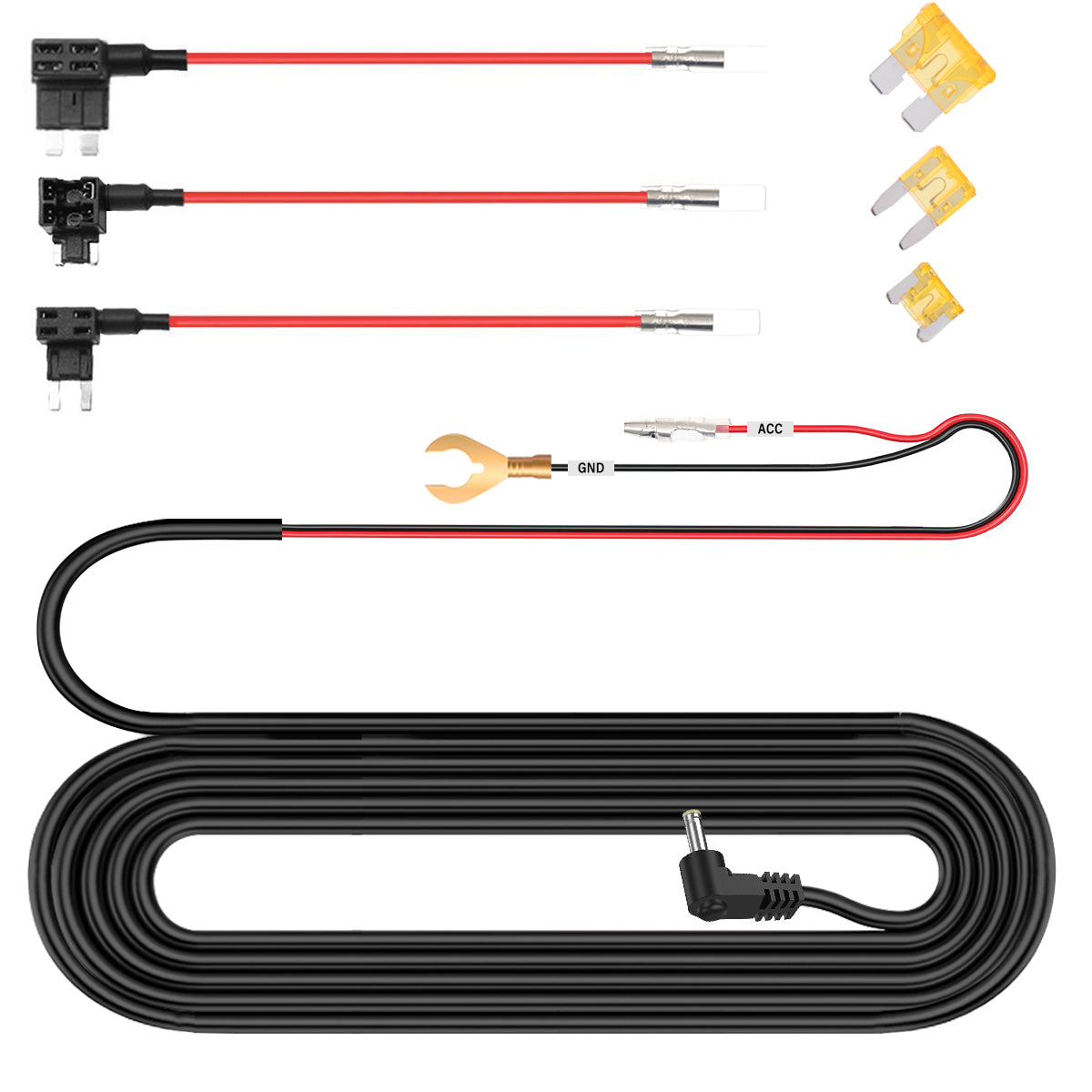
CARPURIDE DC 12V - 24V to 5V/2.5A Max Car Charger Cable kit
gearnudge.com
- Best for
- A hardwire kit with low-voltage protection to save your car battery.
- Avoid if
- You need confirmed live price or guaranteed fit from this page.
- Evidence
- Listing and source evidence
FAQ
What stops cables pulling tight every time the desk moves?
Mount the power strip under the desk with double-sided tape and [route power](/car-tech/route-carplay-screen-power-audio-cables/) and video cables through a monitor arm's hollow channel, so the whole bundle travels with the desk.
How high should the screen sit?
Set the centre of the screen about 15 to 20 degrees below your horizontal eye level. On a 32-inch or larger display, aim by the centre rather than the top edge.
Is the VESA pattern the only mount check?
No. Check the arm's weight rating too, or a heavy monitor will sag. On a thin desk, add a reinforcement support board so the clamp does not crush it.
When should I skip a monitor arm?
If your desk is very thin or the arm is flimsy. A cheap arm makes the wobble worse, and that motion can leave you feeling unwell while you work.
My stock dash cam cable is too short. What are my options?
The Redtiger F7N replacements come in 33ft, 50ft, and 98ft with a 4-pin 2.5mm connection, which suits trucks and RVs. The F17 Elite and VC70 cables use USB-C at both ends and fit only those models.