Quick answer
You park, unplug the dash cam, and remember to plug it back in the next morning. That hassle is exactly why most people end up hardwiring instead. If you just want the easiest setup, plug your gear into the 12V cigarette-lighter socket. It’s a “plug-and-go” method that works for most dash cams and GPS units. However, because most of these sockets turn off when you turn off the engine, you won’t get parking mode.
For phones and tablets, stick to the built-in USB-C ports. Many modern cars offer USB-C PD (Power Delivery) ports that can provide up to 27W of power, which is perfect for fast charging.
Hardwiring is the professional upgrade. It connects your device directly to the fuse box. This allows the device to stay on while the car is parked, provided you use a kit with a low-voltage cutoff to protect your battery.
Who this is for
This guide is for anyone adding new tech to their vehicle and feeling stuck on how to power it. By the end, you’ll know exactly which power source fits each accessory and how to set up parking mode without killing your battery. You might be in one of these situations:
- You are choosing a dash cam and need to decide between using the 12V socket or a fuse-box hardwire kit.
- You are frustrated by visible, dangling wires that make your car look messy or make your gear a target for theft.
- You hate having to manually unplug and replug your camera every time you go to the store.
- Your main goal is to keep your 12V port free for other things while still having a camera that records 24/7.
How to choose: map power source to accessory
Don’t just plug everything into the nearest hole. You need to look at how much power your device draws and how your car’s ports behave.
The 12V socket is your general-purpose power port. It supplies more power than most built-in USB ports because it pulls straight from the car’s electrical system. How much power? That depends on the fuse protecting that socket — a small safety device that’s typically rated at 10 to 20 amps. For example, a 10-amp fuse can deliver about 120 watts, while a 20-amp fuse gives you about 240 watts. The voltage is usually around 12V, but it can climb to about 13.5V or 15V while the engine is running.
Follow this simple map to avoid damaging your gear:
| Accessory Type | Recommended Power Source |
|---|---|
| Phones and Tablets | OEM USB-C PD Port |
| Dash Cams, GPS, Tire Inflators | Dedicated 12V Socket |
| Coolers, Vacuums, CPAP Machines | 15A+ OEM 12V Socket |
Never use USB ports to power high-wattage items like portable vacuums or CPAP machines. They simply cannot provide enough energy.
USB power: best for phones and low-draw gear
USB is a regulated path, meaning the power is controlled and steady. It is perfect for delicate electronics but lacks the “muscle” for heavy-duty tools.
Standard USB ports without “Power Delivery” (PD) are quite weak. A USB 2.0 port only provides 2.5W, while a USB 3.0 port provides about 4.5W. This is fine for a mouse or a simple data connection, but it won’t charge a modern smartphone quickly.
On the other hand, USB-C PD is much more advanced. It uses “dynamic negotiation,” which is a fancy way of saying the charger and the device talk to each other. The device asks for exactly what it needs, and the charger can provide up to 100W. In many cars, the built-in USB-C ports can deliver up to 27W, making them the best choice for your phone.
12V socket power: easiest general-purpose route
The 12V cigarette-lighter socket is the easiest way to power your gear: just plug it in and go. It’s the same round socket that’s been in cars forever, and it feeds power straight from the car’s electrical system.
The big downside is how it reacts to your ignition. In most vehicles, these sockets are “switched,” meaning they only have power when the engine is running. As soon as you turn the car off, the power cuts out. This makes it impossible to use parking mode features on a dash cam.
If you use this method, keep two things in mind:
- You will have visible wires running from your device to the socket.
- You might have to manually unplug your camera when you park to avoid any potential drain, though the main issue is simply that the camera will shut down.
Hardwire power: the parking-mode upgrade
If you want your dash cam to record even when you aren’t in the car, you have to hardwire it. This involves connecting the device directly to your vehicle’s fuse box.
A proper hardwire kit uses three specific wires:
- ACC (Switched): Connects to a fuse that only has power when the engine is on. This tells the camera when you are driving.
- Constant/BATT (Always-on): Connects to a fuse that stays live even when the car is parked. This enables parking mode.
- Ground: Connects to a metal part of the car’s chassis to complete the circuit.
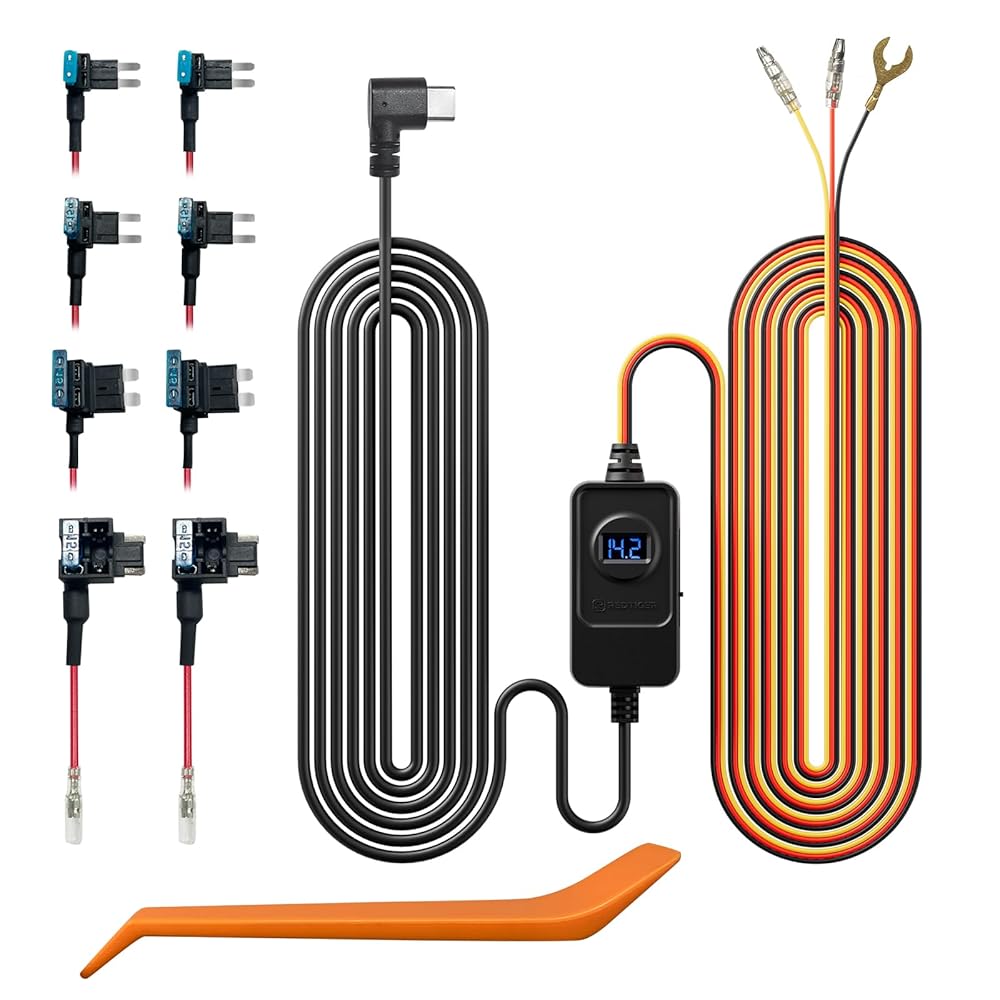
REDTIGER Dash Cam Acc Multi-Size Hardwire Kit with Voltage Indicator for All REDTIGER Dash Camera, USB C Power Port, 24H Parking Monitoring with Low Voltage Protection, Cable
gearnudge.com
- Best for
- A hardwire kit that includes voltage protection for 24H parking monitoring.
- Avoid if
- You need confirmed live price or guaranteed fit from this page.
- Evidence
- Listing and source evidence
Installing a kit like this usually takes 30 to 60 minutes. The biggest benefit is that it hides the wires and frees up your 12V socket for other uses.
Compatibility and setup checks before you buy
Hardwiring is a bit more technical, so you need to do your homework first. You must be able to tell the difference between “constant” circuits (always live) and “switched” circuits (only live with the engine).
A common mistake is tapping the wrong fuse. If you connect your device to a constant 12V circuit that stays on too aggressively, it can create a “parasitic drain.” This could leave your battery too weak to start the car within 24 to 48 hours.
To prevent this, always look for a kit with a built-in Low-Voltage Cutoff (LVC). A quality kit watches your battery and automatically turns the camera off if the voltage drops to a certain level—usually between 11.6V and 12.4V. That way, there’s always enough juice left to start the engine.
When installing, always use a proper “add-a-fuse” tap. Some installers try to save time by twisting a wire around a fuse leg inside the plastic housing, but this is a shoddy, unreliable practice.
Avoid-if guidance
Hardwiring isn’t for everyone. You should probably skip it if:
- You don’t need parking mode: If you only care about recording while you are driving, stick to the 12V socket. It’s easier and carries zero risk of draining your battery.
- You want a “no-hassle” install: If you don’t want to mess with fuse boxes, look for a mirror or sensor-tap adapter. These can be much cleaner and can power both 5V USB and 12V devices at once.
Also, be wary of dealer claims. Some dealers might tell you that hardwiring voids your warranty just to push their own expensive, pre-installed camera packages. This is often a scare tactic.
FAQ
Can I run parking mode from the 12V socket?
No. Most [12V sockets](/car-tech/12v-socket-always-on-vs-switched-power/) are tied to the ignition, so they lose power as soon as you turn the car off.
What wires does a hardwire kit use?
You will typically see three: ACC (switched), Constant/BATT (always-on), and Ground (to the chassis).
How does low-voltage cutoff protect my battery?
The kit acts like a safety switch. Once your battery voltage hits a set threshold (like 11.6V or 12.4V), the kit cuts power to the accessory so your car can still start.
What should I pay for a quality hardwire kit?
For reliable brands like Nextbase, Vantrue, BlackVue, or Thinkware, a hardwire kit is one of the cheaper parts of the install — far less than the camera itself. Check the current US price on the seller page, because kit pricing moves often.